

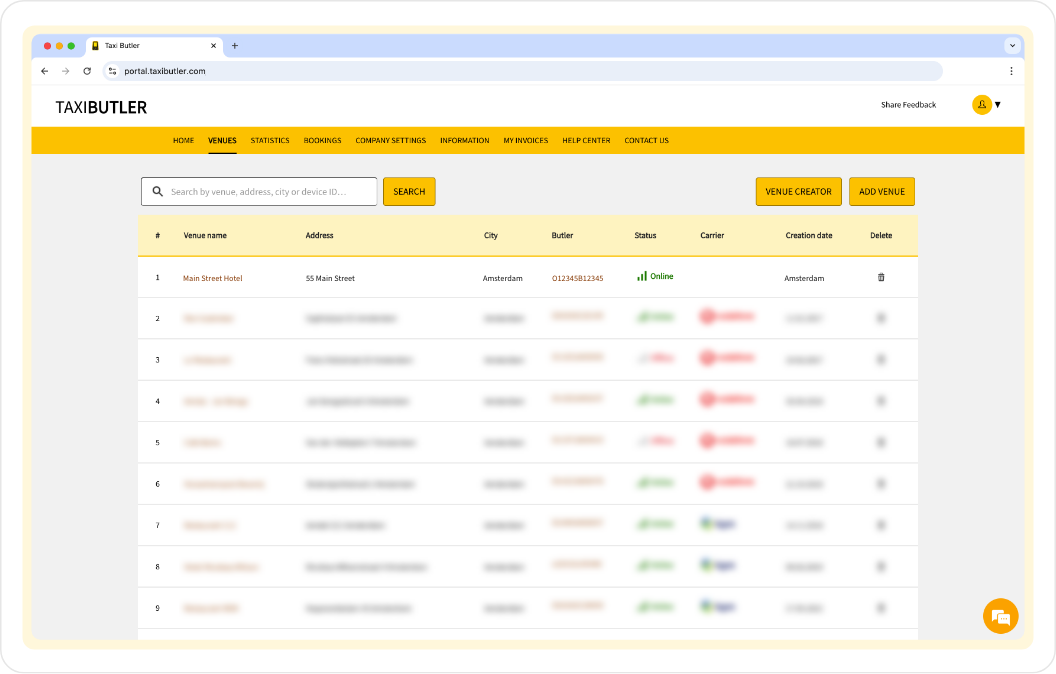
- Search for a venue
- Access the Venue Creator
- Add a venue
The name of the venue where the device is installed (e.g., hotel, bar, restaurant).
The street address of the venue.
The city where the venue is located.
The specific Taxi Butler devices associated with the venue.
Indicates the current operational status of the device (e.g. online, recently online, offline).
You can hover over the Status to see more information.
The mobile network or service provider used by the device, if applicable.
The date the venue was created.
An action field used to remove the venue.
The Venue page
The Venue page shows information about a specific venue. You can access a Venue page by clicking on the venue name from the Venues page table mentioned above. Information about this venue is displayed in three (or four) tabs:- Pick-up
- Bookings
- Taxi Butler(s) at venue
- (Taxi Butler QR(s) at venue)
The “Pick-up” tab shows all the information and settings for this particular venue. This is also where you will edit venue information like address, display name, and language, and set up device configurations & options for this venue.